Designing the Order Command Center
PSP operators weren't struggling to manage orders. They couldn't see them. I led discovery, problem definition, and end-to-end design of the platform built to fix that.
My Role
Senior Product DesignerProduct type
B2B Enterprise SoftwareYear
2025 - 2026Organisation
HP Inc. (IPSS)01 / Context
HP's primary workflow product for print service providers (PSPs) has always been strong where it matters at scale: production automation, press scheduling, job execution. What it doesn't handle is the messy, high-volume reality that happens upstream of production. The emails, API calls, ecommerce integrations, and manual entries that flow into a PSP's operation every day from dozens of brands and channels.
Connect PSP is built to own that layer. Accept orders from virtually anywhere, route them intelligently, and give CSRs full visibility from arrival through dispatch. Not a replacement for existing production tools; the layer that sits upstream of them.
I joined when the POD was in discovery. No brief. No predefined scope. A problem space, a PM, an engineering team, and a mandate to understand it.
HP's workflow software was
built for production. Not intake.
02 / What we found
The assumption was broad.
The problem was specific.
The team's working hypothesis going in: PSPs need better order visibility and workflow automation. Reasonable. But two rounds of structured interviews across eleven organisations, covering Order Managers, CSRs, Brand and Account Managers, and IT leads, showed that the need was real and highly segmented in ways that mattered for every product decision downstream.
Conflating the segments would have led to the wrong product.
Three patterns emerged clearly, each with its own primary pain and its own definition of "better":
Small PSPs
60–100
daily orders
90% of orders via email
Drowning in manual intake. CSRs spent half their working day moving information from inboxes into systems. The risk of human error was constant. Automation wasn't an abstract priority. It was survival.
Medium PSPs
100–300
daily orders
Visibility gap + intake pressure
Needed a dashboard they could act on. Most had built their own workarounds: custom reports, spreadsheets, disconnected tools. Existing solutions gave them data, but not an overview they could use to plan and prioritise in real time.
Large PSPs
300–2000
daily orders
“Connectivity is complicated"
The resources to build internal solutions, but systemic integration complexity: hundreds of brand SKUs to onboard, multiple MIS platforms to reconcile, and the ongoing maintenance cost of custom middleware just to get systems talking.
The competitive landscape confirmed the gap. Existing tools were either MIS-heavy (strong on production, weak on intake) or technically demanding to configure. The opportunity was owning the order's journey before production begins: capture, standardisation, routing, and monitoring.
03 / Approach
Research shaped the product.
The product didn't shape the research.
I took ownership of the research strategy from the start, running two structured interview rounds and leading synthesis. The goal was not to confirm what we already suspected but to understand what segmentation actually meant for product decisions, so that when we got to design we weren't guessing at who the primary user was.
I brought the segmentation model back to the PM and engineering lead as a structured problem definition, not a list of user needs. That framing became the shared language the POD used to make scope decisions throughout the project. When the question was "should we build X," the answer came from which segment it served and how acutely.
From there I moved to information architecture before any layouts. The core structural question, whether to organise the interface around order sources or around a unified operational view, was more consequential than any individual screen design. I worked that question through with the team before committing to a direction, because the answer shaped the entire surface area of the product.
I also instrumented the product for measurement before launch rather than after. Because the product hadn't shipped, we had no usage data to fall back on. Rather than wait, I defined the measurement framework as a design deliverable alongside the screens.
04 / The work
One place for every order. Here's how we built it.
Operators don't think in channels. They think in orders. Every design decision flowed from that. The product had to show everything in one place, let people customise what they see, and keep AI assistance inside the workflow rather than adjacent to it.
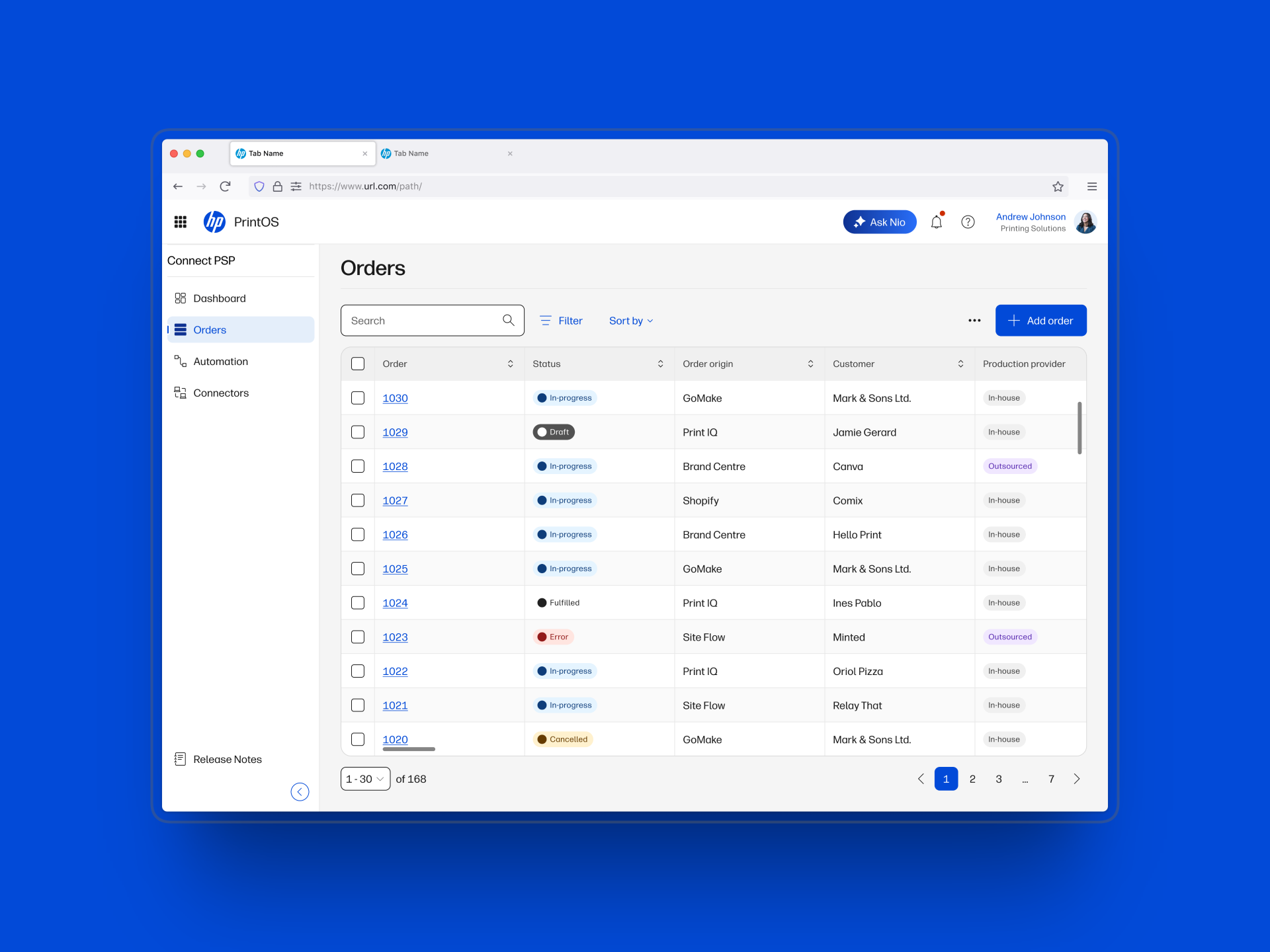
Screen 01 — Orders Table
The operational home base.
All orders, all sources, one view. The table surfaces every ingestion channel without requiring the operator to know or care which channel an order came from. Column configuration is role-adaptive: a CSR's view looks different from an account manager's. Alerts surface directly in the row, with a dedicated interaction to investigate without leaving the table. This surface is the decision that everything else in the product either supports or enables.
Screen 02 — Filter system
Precision without rebuilding state.
Operators at medium and large PSPs check their table multiple times per shift. A filter system that required rebuilding state every time would have been friction in exactly the wrong place. Filters are persistent and stackable, with clear active-state signalling so operators always know what subset they're looking at.
Screen 03 — AI table management
AI that fits the workflow, not the other way around.
Scoped specifically to table management: reshaping the view, surfacing anomalies, and answering order-level questions in context. Not a general-purpose assistant. The scope was deliberate. PSP operators have low tolerance for tools that ask them to change how they work. AI that fits existing behaviour earns adoption; AI that demands a new behaviour doesn't.
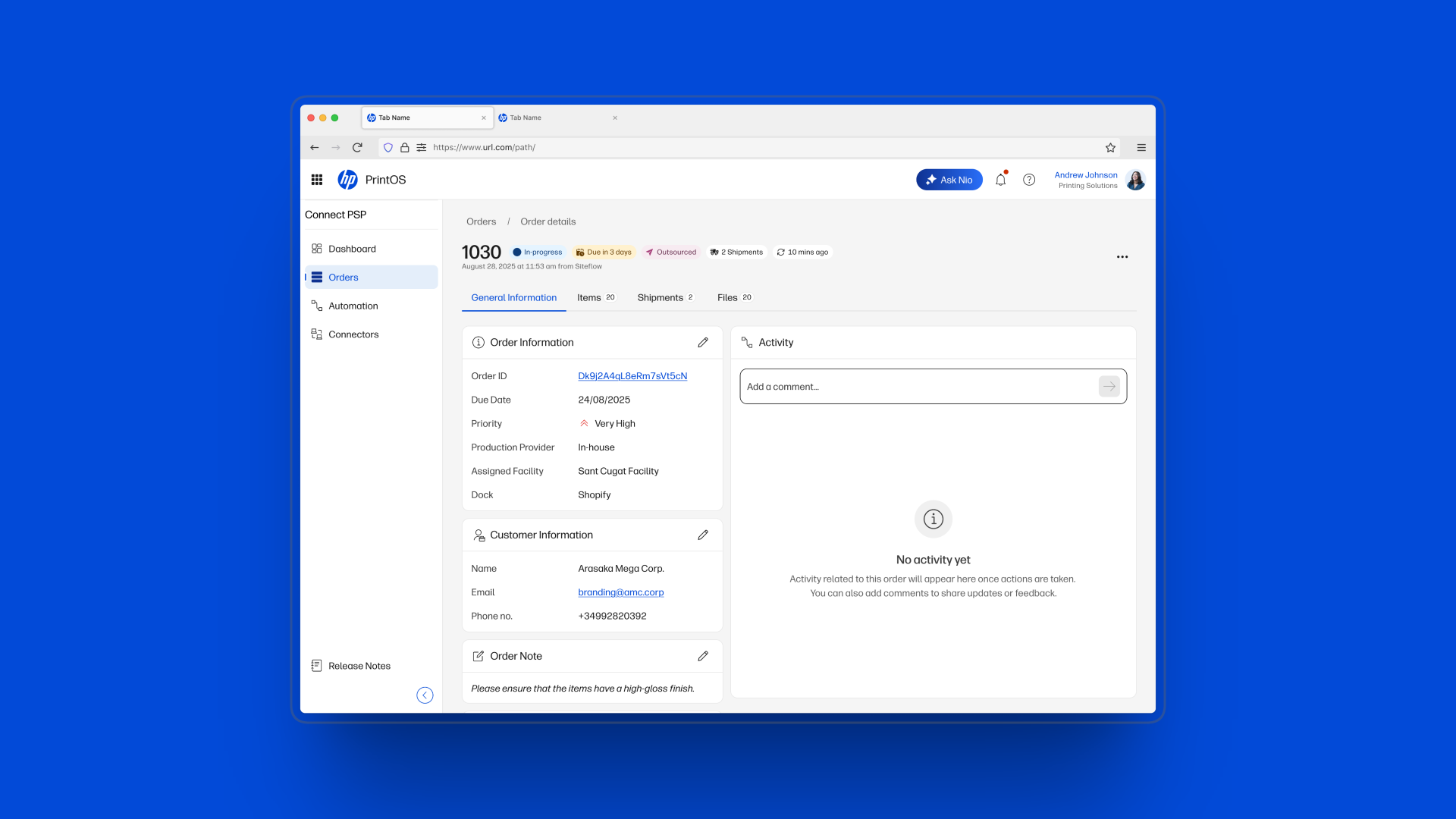
Screen 04 — Order detail
Every role gets its layer.
A tabbed architecture that separates core order information from production history, attachments, and activity log. Research showed CSRs check status and customer information; account managers dig into activity and history. Tabs let each role navigate to their layer without noise from the others. The architecture came directly from what we heard about role-based scanning in the interviews.
05 / Key decisions
Four calls. Each one had
a real alternative.
01. One unified table, not a per-source inbox
The early instinct was to organise the interface around where orders came from: a tab or view per channel. It would mirror how PSP operators currently think about their work, which felt like a reasonable starting point. I rejected it with the PM after synthesis. The core pain wasn't multiple sources. It was no single place to see everything together. A source-segregated UI would have reproduced the fragmentation in the interface itself. The unified table required a more robust filter and column system to compensate, but it was a fundamentally stronger product premise.
02. Columns as a user-controlled surface, not a predefined schema
A fixed column set would have served the average user adequately and the real user poorly. What matters to a CSR handling email intake is different from what an account manager needs when checking brand SLAs. Column customisation became a first-class feature. The engineering constraint was real: the team needed to know which columns were always present versus configurable, to avoid unbounded data queries. We defined a locked set of core identifiers (order number, status, customer) and an opt-in set of contextual columns. Both sides got what they needed.
03. Enabling Nio's AI workflows inside Connect, not building AI from scratch
Connect is part of PrintOS, HP's print production operating system. PrintOS already ships with Nio, HP's AI-powered companion built for industrial print workflows. The design question was never "should we add AI?" It was "how do we surface Nio's capabilities in a way that fits how PSP operators actually work inside Connect?"
There's a version of this where Nio becomes a sidebar chat panel operators have to context-switch into. That version would have failed. PSP operators spend their day scanning and triaging orders, not formulating queries. I worked with the team to define which Nio capabilities belonged directly in the table: surfacing overdue or high-priority orders automatically, reshaping column views by role, answering questions about a specific order in context. AI that fits existing behaviour earns adoption. AI that demands a new behaviour doesn't.
04. Instrumentation as a design deliverable, not an afterthought
Because the product hadn't launched, we had no usage data. Rather than wait until post-launch to define what we were measuring, I built a comprehensive events and metrics framework before launch: over 50 tracked events covering search behaviour, filter adoption, column configuration, pagination depth, alert engagement, and order creation patterns. Each event maps to a defined metric with a clear calculation method and an engineering contract. When the product ships, we are not starting from zero.
06 / Setting up for success
Instrumentation and AI aren't
features. They're foundations.
Two practices shaped how this product is positioned for long-term success, both of which I pushed for as design work rather than engineering tasks or product additions.
Bringing Nio into Connect the right way
PrintOS, the platform Connect lives inside, already has an AI layer: Nio, HP's AI-powered companion for industrial print production. We weren't building AI from scratch. We were designing how Nio's capabilities surface inside Connect's order management workflow specifically.
That distinction mattered for every design decision. The question was not "where can we add AI?" It was "which Nio capabilities make sense at the moment an operator is scanning or triaging orders, and how do we surface them without requiring a behaviour change?" That framing kept the integration scoped to the table, where operators already live, and away from patterns that would have pulled them out of their workflow to use it.
HP's industrial print clients are sophisticated buyers who expect AI in the tools they adopt. But they judge it on whether it reduces workload, not on whether it's present. Getting the Nio integration right from the start, grounded in how operators actually work in Connect, is what makes the difference between a feature that gets demoed and a capability that gets used.
Measurement built into the handoff, not defined after launch
Because Connect PSP hadn't launched, we had no usage data. The default approach would have been to ship, observe, and instrument retrospectively. I pushed to treat the measurement framework as a design deliverable, defined and handed off alongside the screens.
Working surface by surface, I defined tracked events directly tied to the interactions in the designs: what triggers each event, what parameters to capture, and what metric each event feeds into. The surfaces covered:
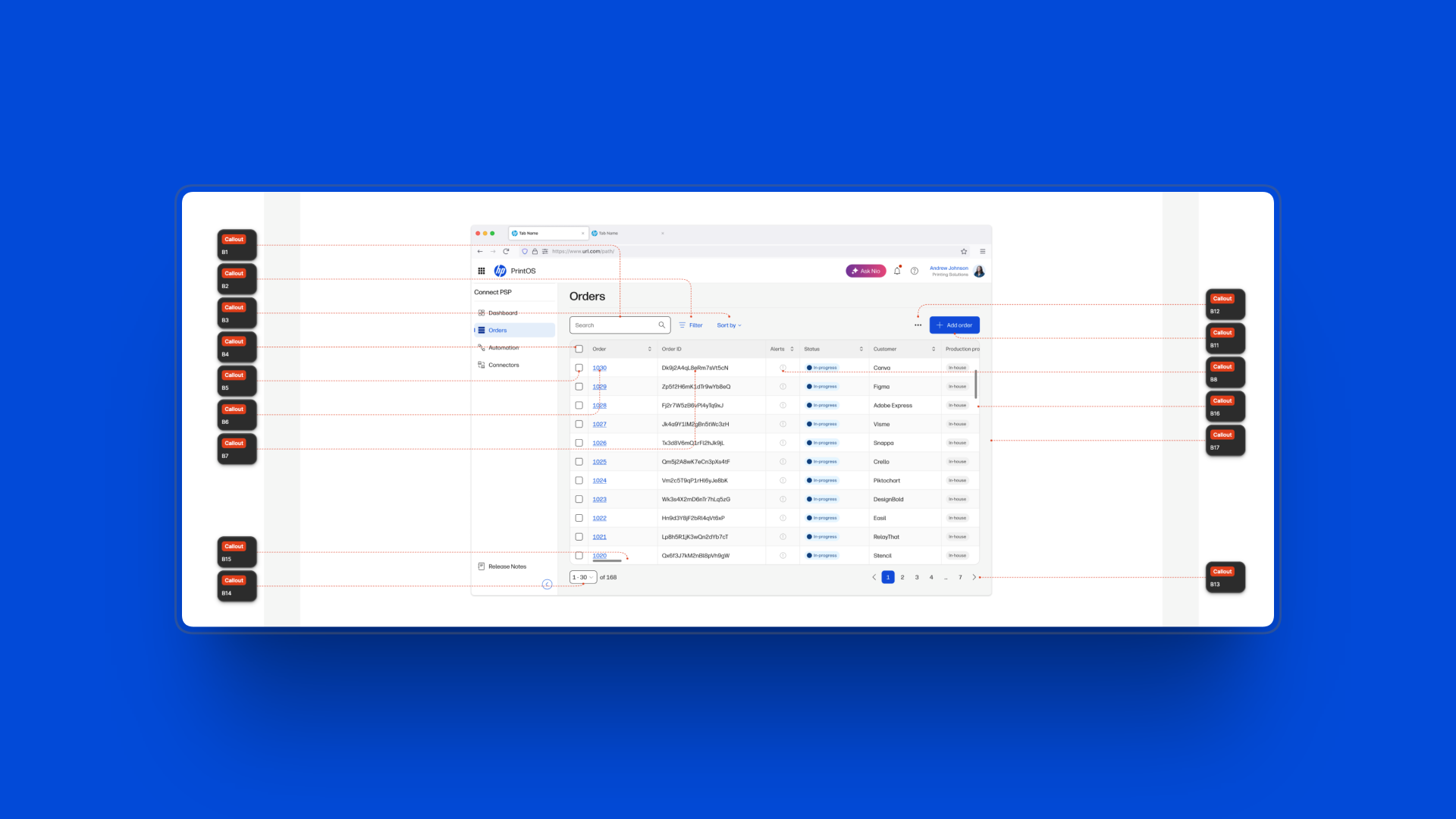
Orders Table
Search submit, filter open, sort change, bulk select, row select, order detail open, order ID interaction, alert open, order create start, pagination change, column scroll.
Filters panel
Panel open and close, filter apply, clear all, section expand and collapse, individual filter value changes.
Sort panel
Panel open and close, sort field change, sort direction change, sort apply and cancel.
Column options
Panel open, column toggle, column reorder, reset to default, apply.
Order detail tabs
Tab navigation, field interactions, attachment access, activity log scroll, shipment detail open.
Each event feeds into a named metric with a defined calculation: Search Success Rate, Filter Adoption Rate, Sort Apply Rate, Column Customisation Rate, Alert Engagement Rate, and so on. When the product ships, the engineering team has a data contract. We are not starting from zero.
Defining what success looks like before you ship is a design decision. Leaving it until after is a choice to fly blind.
07 / Outcomes
POC validated with customers. We ran demo research sessions with PSP participants across our target segments. Response was strong, particularly to the unified table and column customisation concept. The framing of "accept from anywhere, route anywhere" resonated most with medium and large PSPs, who described current connectivity as one of their highest-friction problems.
The product hasn't launched.
Here's what exists now.
Segmented product direction confirmed. The research gave the whole POD and stakeholders, a shared and specific understanding of who the product is for and why different segments need different things. That alignment reduced scope ambiguity as we moved into build.
Launch-ready measurement framework. Events defined per surface, metrics named and calculated, engineering contracts established. We will know from day one whether users are finding value in the table or working around it.
Roadmap shaped by findings. Automation, workflow routing (Docks and Rules), and Connectors are the next major features, a direct consequence of what discovery surfaced as unmet needs for medium and large PSPs. The research didn't just inform the current design. It defined what comes next.
15+
PSP organisations interviewed across small, medium, and large segments
5
Product surfaces with fully specified event tracking and metric definitions in the handoff
0
Days after launch before we start measuring. The framework ships with the product.
08 / Reflection
The research was
the design.
If I were doing this again, I would push harder for observation sessions earlier: watching operators work in their actual environment, not just hearing them describe it in interviews. Several patterns that surfaced late, like how scanning behaviour differs between roles, or how much of the day is spent on non-system tasks like email triage, would have sharpened the design earlier and reduced revision cycles.
The segmentation model also took longer to solidify than it should have. We were initially trying to design for all PSP sizes at once. The shift to designing with segment-specific primary use cases in mind, and accepting that some features matter more to one segment than another, was the unlock that made the product direction coherent. I would establish that frame at the start of discovery, not midway through synthesis.